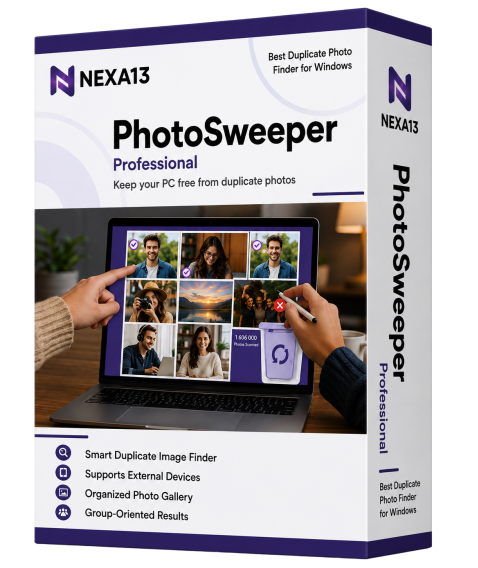
Best Duplicate Photo Finder for Windows

Keep your PC free from duplicate photos by removing similar looking images in just one click. Get PhotoSweeper for Windows to identify and remove unwanted copies of your photos.

Download EASY DOWNLOAD
Security 100% SAFE & SECURE
Support 24/7 EXPERT SUPPORT
Nexa13 Tune-It Software Box

Key Features of PhotoSweeper Professional

Notifications

Smart Duplicate Image Finder

It uses the most advanced algorithms to find duplicate and similar looking images on your PC.

Restore

Supports External Devices

In addition to removing duplicates from the picture library, it also declutters portable hard drivers such as the Pen Drive.

Backup

Organized Photo Gallery

Make your photo gallery clutter-free and organized by removing unwanted image copies from your PC.

Speed

Group-Oriented Results

Experience group-based duplicate results to help you make informed decisions with PhotoSweeper.

How does PhotoSweeper Professional Remove Duplicates?

PhotoSweeper Professional uses state-of-the-art technologies to ensure accurate duplicate photos identification and removal.

Step one

Finds Duplicate Photos

As soon as you install the software, it runs a deep scan to find similar pictures from every hidden corner of your Microsoft Windows system. No twin or almost a twin image can escape from the intelligent algorithms that it employs.

Moreover, it also allows you to set the image matching criteria to identify the correct duplicates.

Finds Duplicate Photos
Step two

Organizes Results in Groups

Getting rid of space-hogging images becomes easier as it shows you the scan results in neatly organized groups so that you can effortlessly decide which pictures you want to delete and remove them in no time.

Finds Duplicate Photos
Step three

Automarks duplicate images

Selecting the pictures can be a tiresome task if you need to select them one-by-one. PhotoSweeper Professional is among those rare duplicate photo removers that lets you mark all the images automatically with just one click.

Finds Duplicate Photos
Step four

Removes identified duplicates

With time, junk files accumulate and negatively impact PC performance. Similar and exact image copies are the toughest to remove junk files. PhotoSweeper Professional is among the best duplicate photo finders to remove both identical and nearly identical pictures with ease.

Finds Duplicate Photos
Step five

Improved Storage Space

We all love clicking pictures and often end up shooting the same scene multiple times. If left undeleted, these extra clicks pile up in our device and hog up the storage space. With this intelligent duplicate photo cleaner for Microsoft Windows PC, you can remove every trace of duplicates from the PC to free up ample space for faster and smoother device performance.

Finds Duplicate Photos

Frequently Asked Questions

How can I install PhotoSweeper?

Installing PhotoSweeper is as simple as it gets! Here are the steps to do it.

  1. Click the download link in the confirmation page or email sent to you.
  2. Wait for the setup to download.
  3. Once the setup downloads, right-click on it and select Open.
  4. Allow the setup file to scan your device.
  5. You’re all set!

How does PhotoSweeper work?

PhotoSweeper Professional is a duplicate photos remover tool that ensures an organized gallery and better storage space. Here is how it works.

  1. Download and install PhotoSweeper.
  2. Add the folders containing duplicate images to the scan area. Alternatively, you can also drag and drop them to the scan pane.
  3. Set the matching criteria as per your preference.
  4. Click on the “Scan” button to begin the scanning process.
  5. After the scan completes, review the results, and delete the undesired duplicates.

What image formats does this software support?

No matter what the picture format is, you can remove duplicates easily. It supports all major formats, such as JPEG, TIFF, PNG, BMP, GIF, and more.

Can I remove duplicates from external devices?

Since external devices such as portable drives have become one of the most widely used mediums to store images, there are high chances of duplicate pictures in them. With PhotoSweeper, you can scrape away duplicates even from external devices.

Which Windows versions support PhotoSweeper?

PhotoSweeper works with all major Windows versions, including Windows 11, Windows 10, Windows 8.1, Windows 8, and Windows 7.

How to activate PhotoSweeper Professional?

  1. Launch PhotoSweeper.
  2. On the bottom right, click the “Activate Now” button.
  3. If you already have an Activation code, paste the code in the box provided and click on “Activate Now”.
  4. If you want to upgrade, click the “Purchase Now” button. Follow the steps to make the required payment and copy the activation code that you get.
Get In Touch

We’d love to hear from you!

Fill out some info and we will be in touch shortly.

Mail Icon

info@nexa13.com

Pin Icon

15001 Meridian Parkway, Suite A Riverside CA 92518

Delete Your Duplicate Photos Today!

Download now, or call/chat with us for questions or to help with installation.

Need Help Installing? Phone+1 (323) 307-7107
BUY NOW